








Datasets · Property
Buildings in 3D, already linked to every property.
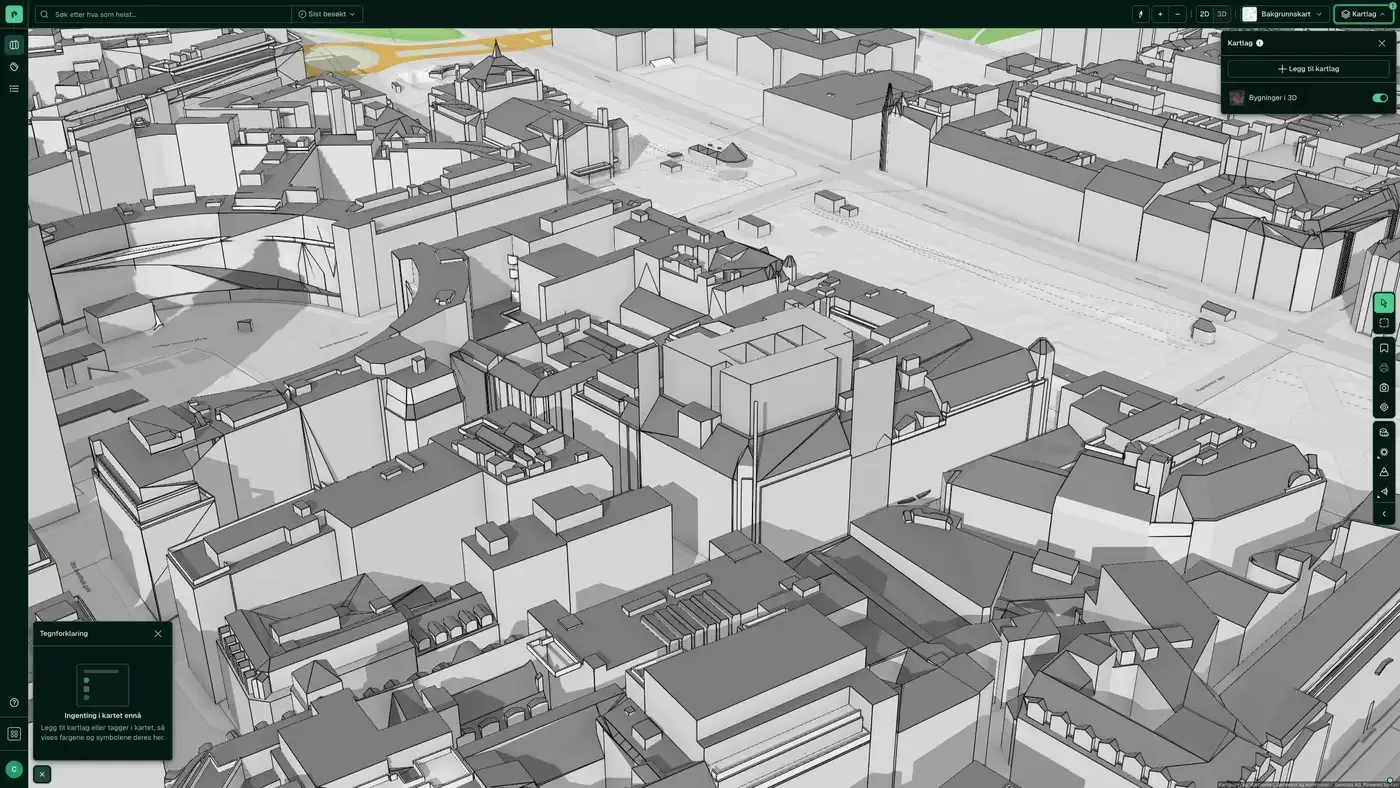
Contains buildings across Norway, derived from FKB, aerial photos and LiDAR data (laser). Source: Geodata AS.
What the dataset contains
Buildings in 3D in Placepoint
Contains buildings across Norway, derived from FKB, aerial photos and LiDAR data (laser). Source: Geodata AS. Part of Placepoint's Property map layer.
This text is based on the dataset documentation, synced 16 October 2026.
What it looks like
Buildings in 3D on the map
The dataset is part of the Property map layer. You can find the screenshot, sublayers and what a click on the map shows under Buildings in 3D.
Update frequency: Static. Last updated 9 September 2026
More in the Property map layer
Datasets often read together
Number of transactions (property)
The number of registered property transactions per basic statistical unit over a given period, based on the matrikkel.
About the datasetHousing and area reserve (Oslo)
Oslo kommune's own overview of zoned housing in the capital: a compiled zoning reserve that covers both detailed zoning plans (individual projects) and area zoning plans (larger areas).
About the datasetApartment building
All building types classed as housing in the matrikkel, with building geometry from Felles kartdatabase (FKB).
About the datasetBuilding age
Detailed overview of the year buildings across Norway were built, based on the information municipalities have registered in the matrikkel, with building geometry from Felles kartdatabase (FKB).
About the datasetCoverage Map Case Access
Shows which municipalities we collect public records lists from to power the Saksinnsyn feature.
About the datasetProperty prices
Average property price per basic statistical unit, based on compiled transaction data from Eiendomsverdi, Kartverket's matrikkel and Statistics Norway (SSB).
About the datasetHow often is the Buildings in 3D dataset updated?
Static. The frequency follows the source and is shown on the dataset in Placepoint.
Where does the data come from?
From Geodata AS. We collect and quality-check the data and place it on the correct property, with source and date on every field.
How do I see Buildings in 3D for a property?
Look up the address in Fusion and turn on the Property map layer. The dataset is a separate layer there, and the details appear in the property panel when you click on the map.
Can I get the dataset programmatically?
Yes. The same data is available in Placepoint API and in Placepoint AI through MCP, so you can bring it into your own systems and agents.
Used where decisions really matter