








Datasets · Business
Grocery chains – heat map, already linked to every property.
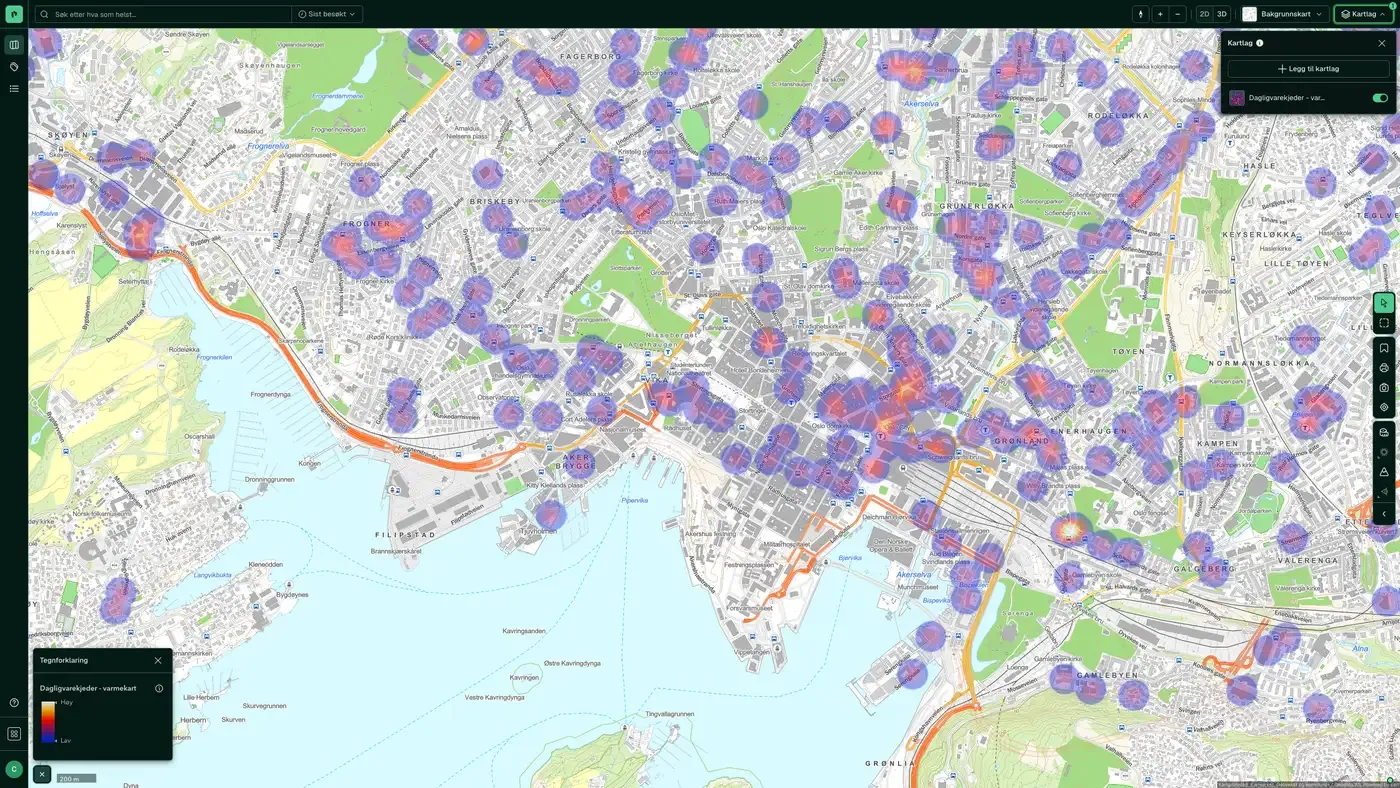
Density map based on all grocery stores in Norway, useful for identifying areas with high or low coverage. Source: Geodata AS.
What the dataset contains
Grocery chains – heat map in Placepoint
Density map based on all grocery stores in Norway, useful for identifying areas with high or low coverage. Source: Geodata AS. Part of Placepoint's Business map layer.
This text is based on the dataset documentation, synced 16 October 2026.
What it looks like
Grocery chains – heat map on the map
The dataset is part of the Business map layer. You can find the screenshot, sublayers and what a click on the map shows under Grocery chains – heat map.
Update frequency: Weekly. Last updated 9 September 2026
More in the Business map layer
Datasets often read together
Facilities register
The national register of sports facilities, cultural buildings and outdoor recreation facilities that have received or applied for gaming funds, managed by the Ministry of Culture and Equality (KUD).
About the datasetPharmacies
All pharmacies in Norway with chain affiliation (Apotek 1, Vitusapotek, Boots,...), industry codes, revenue, number of employees and operating profit.
About the datasetBuilding materials stores
All building materials stores in Norway, including chains such as Maxbo, Byggmakker, Coop Obs Bygg, Optimera/Montér and Bauhaus, with chain affiliation, industry codes, revenue, number of employees and operating profit.
About the datasetGrocery Chains
All grocery stores in Norway, including REMA 1000, Kiwi, Coop Extra/Mega/Prix, Meny, Spar, Joker and Bunnpris, with name, address, phone number, net revenue, operating profit and chain affiliation.
About the datasetReal Estate Transactions in the Media
Our derived overview of purchases and sales of property and property companies reported in the media. These are typically larger commercial property transactions and company sales covered by Estate Nyheter, DN Eiendom, E24, Finansavisen and similar publications.
About the datasetOwnership and Company Structure
Our compilation of businesses, their parent companies and NACE industry classification.
About the datasetHow often is the Grocery chains – heat map dataset updated?
Weekly. The frequency follows the source and is shown on the dataset in Placepoint.
Where does the data come from?
From Geodata AS. We collect and quality-check the data and place it on the correct property, with source and date on every field.
How do I see Grocery chains – heat map for a property?
Look up the address in Fusion and turn on the Business map layer. The dataset is a separate layer there, and the details appear in the property panel when you click on the map.
Can I get the dataset programmatically?
Yes. The same data is available in Placepoint API and in Placepoint AI through MCP, so you can bring it into your own systems and agents.
Used where decisions really matter